
Eight sources, all loaded, one on air
A service is not one deck played start to finish. It is songs, a reading, a notice, a countdown, a handful of photos somebody sent that morning and a video, arriving in an order nobody fully agreed on. Each of those gets its own pipeline, cued and waiting.
Every source, every screen,
on one canvas.
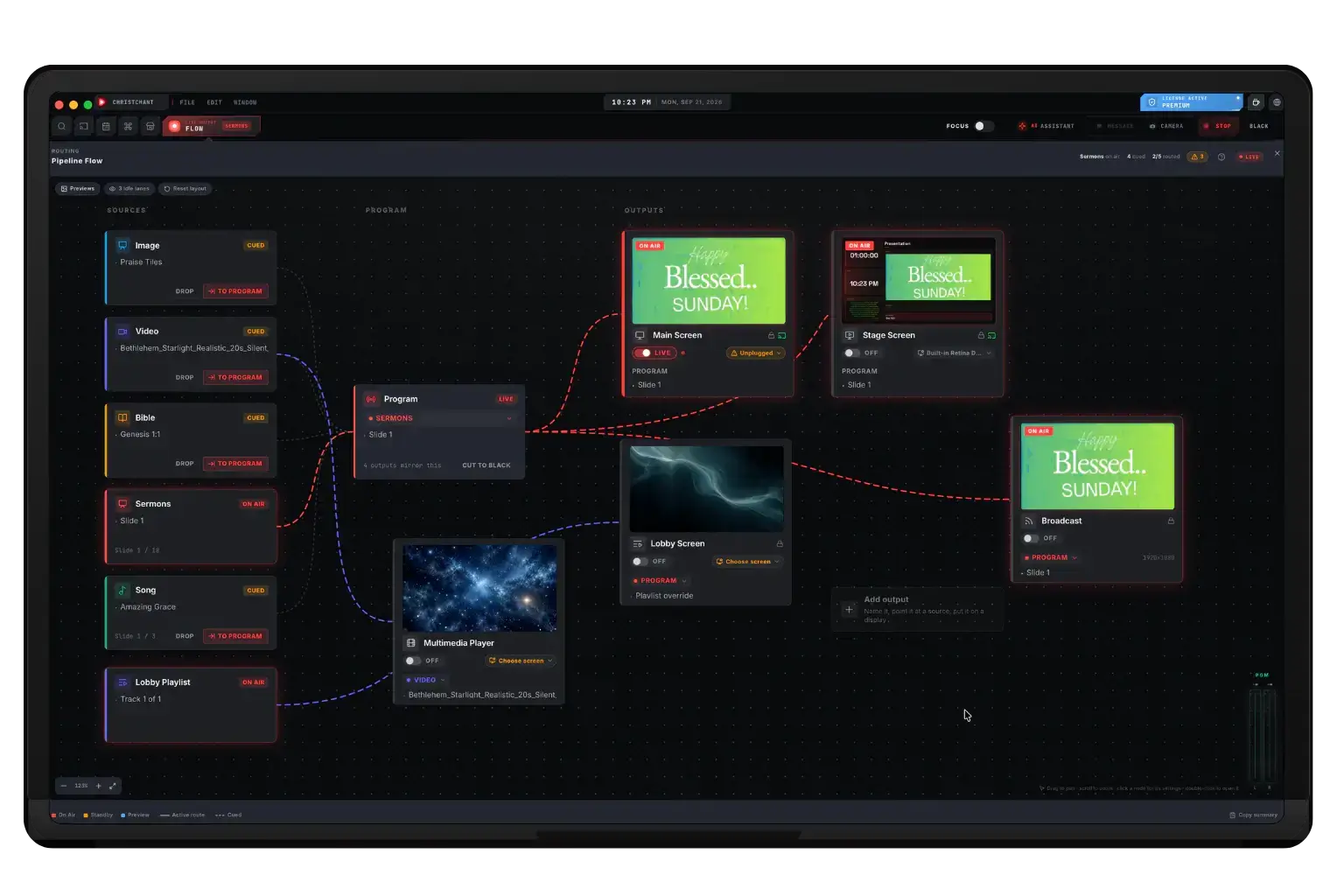
Eight pipelines are loaded at once and each screen wants something different: the congregation sees the lyrics, the stage sees the next verse and a clock, the lobby keeps looping. Pipeline Flow draws that as a routing canvas, so what is ON AIR and what is merely cued is something you can see rather than remember.
- Every pipeline loaded and cued at once, exactly one on air
- Point an output at program, or give it a source of its own
- Add an output, name it, and put it on any connected display
- As many screens as your GPU can drive, with no cap in the software
- Cut every mirrored output to black in one click
Loaded in parallel
Every pipeline holds its own preview and live state at the same time.
One master, deliberately
Exactly one pipeline is on air. Sending another live is a decision, not an accident.
Images without a deck
Drop photos straight into the Image lane and run them. No import, no file to clean up.
Renameable slide lanes
Slide B, C and D take the names your team actually uses for them.
Every source, side by side
Song
Worship songs and lyrics, with the section pipeline your set is built from.
Bible
Scripture verses and passages, pulled from the Bible stored on the machine.
Slide A
The primary slide and presentation lane: imported decks and slides you build.
Slide B
RenameableA second independent slide lane. Defaults to announcements, and can be renamed.
Slide C
RenameableA third slide lane. Defaults to lobby content, and can be renamed.
Slide D
RenameableA fourth slide lane. Defaults to timers and countdowns, and can be renamed.
Video
Video media, with its own playback state and remote control from your phone.
Image
Throwaway photo decks: drop images in, run them, and they are gone after the service.
Cue everything, then choose
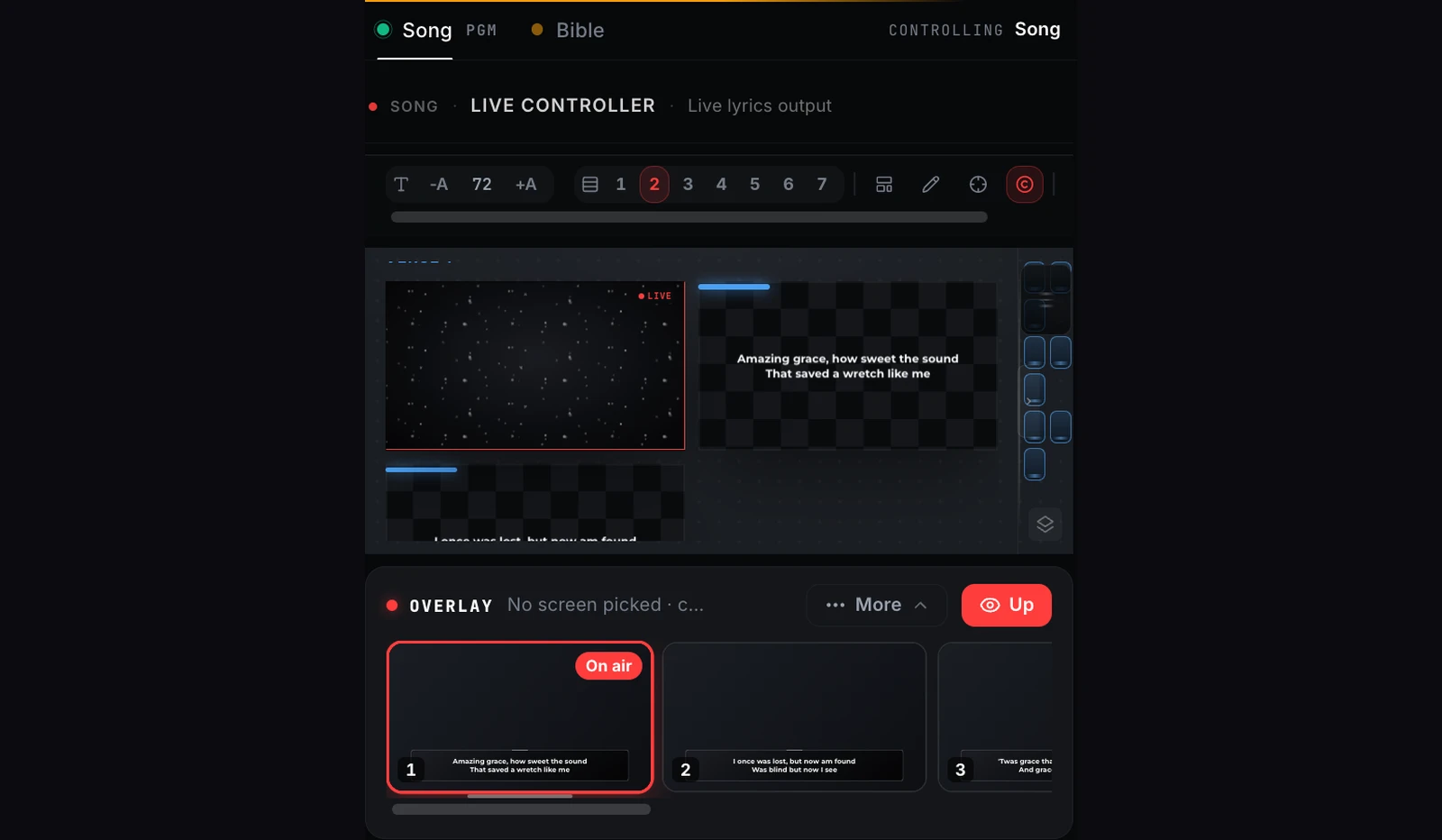
Each pipeline keeps a preview and a live state of its own, so the countdown can be loaded while the song is on air and the reading is queued behind it. Sending a pipeline live takes a snapshot of its settings, so changes you make in preview afterwards do not leak onto the screen.
- Every pipeline previews independently of what is on air
- Exactly one pipeline is master at a time
- Settings snapshot at send-to-live, so preview edits stay in preview
- Jump between sources without rebuilding a deck
A media player that knows it is on air
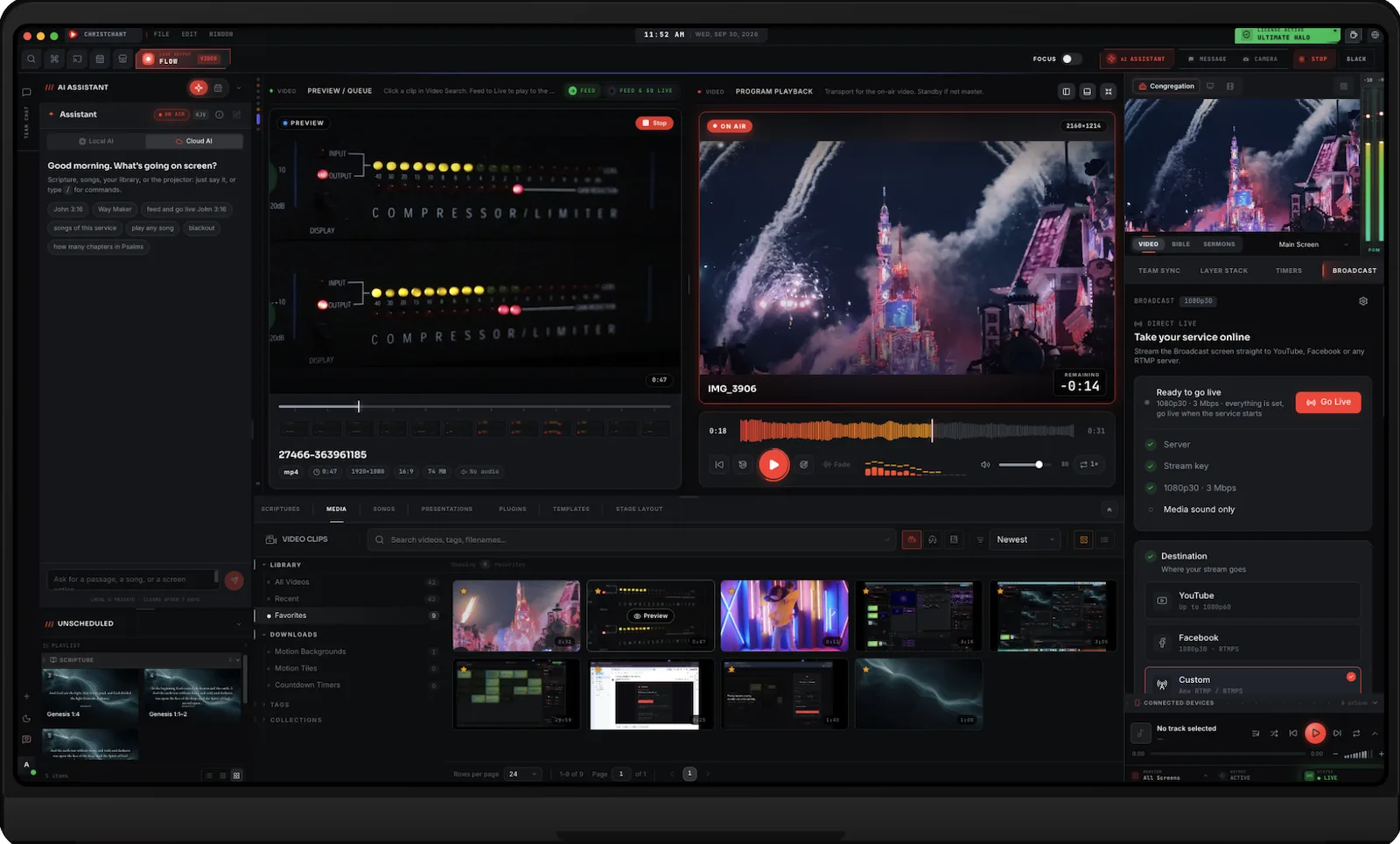
Video gets its own pipeline, so the next clip can be previewed and cued while another is already playing to the room. Program playback shows the operator what the congregation cannot: a waveform to scrub along, a countdown of the time remaining, and fade, loop and speed controls on the same bar. When the service is streamed, the Broadcast tab sits beside it and sends the Broadcast screen to YouTube, Facebook or any RTMP server.
- Preview and queue a clip while another plays on air
- Waveform scrubber and a remaining-time countdown on program
- Fade, loop and playback speed on the transport bar
- Search clips by name, tag or file, and group them into collections
- Go live to YouTube, Facebook or custom RTMP from the Broadcast tab (Premium)
Every source, every screen, on one canvas
Eight pipelines are loaded at once and each screen wants something different: the congregation sees the lyrics, the stage sees the next verse and a clock, the lobby keeps looping. Pipeline Flow draws that as a routing canvas, so what is on air and what is merely cued is something you can see rather than remember, instead of holding it in your head.
- Every pipeline loaded and cued at once, exactly one on air
- Point an output at program, or give it a source of its own
- Add an output, name it, and put it on any connected display
- As many screens as your GPU can drive, with no cap in the software
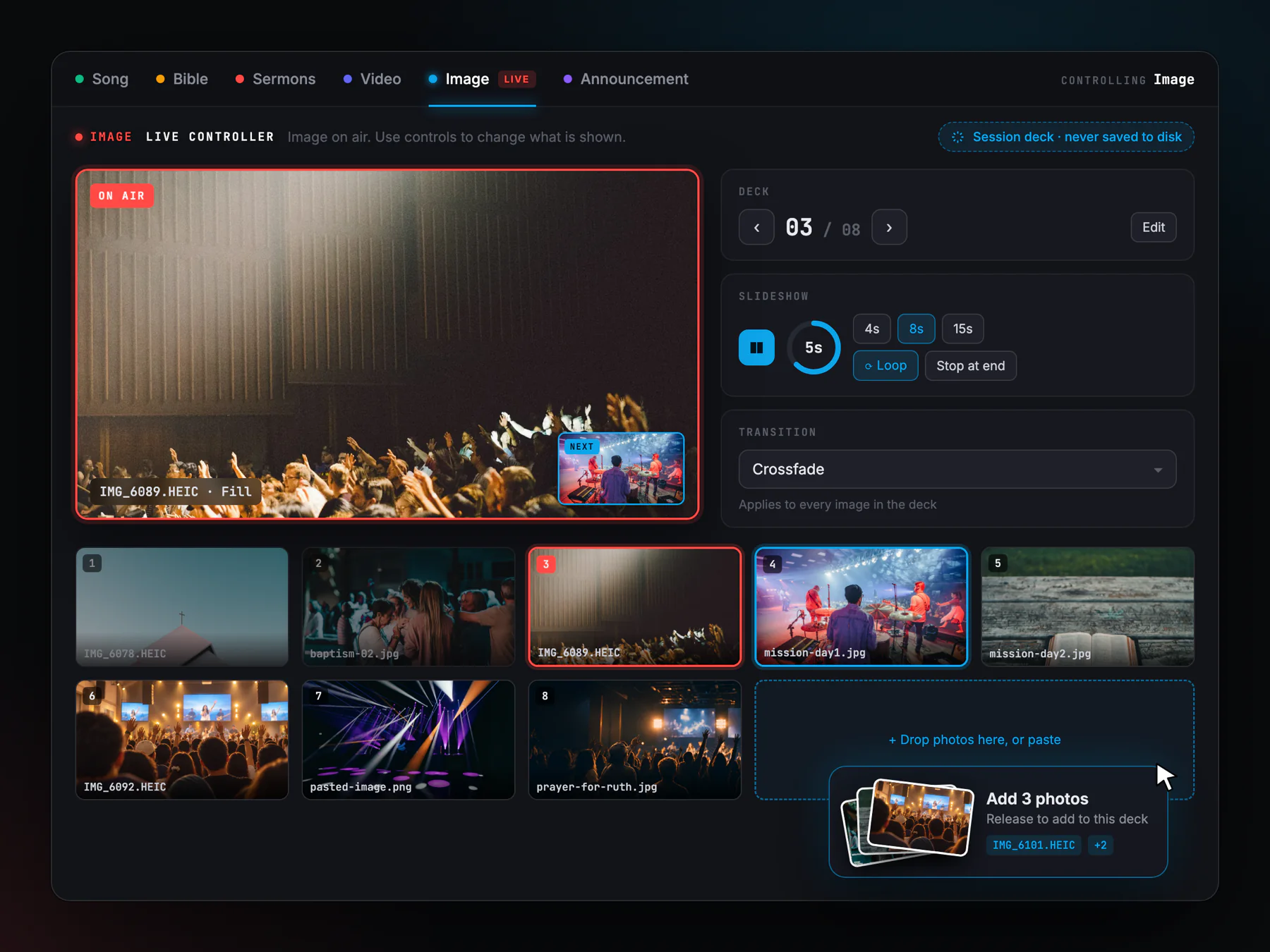
The photos that arrive an hour before the service
Baptism photos, a mission-trip set, a picture of someone the church is praying for. None of it belongs in a saved deck, and building one for it wastes the hour you do not have. The Image lane takes files dropped straight onto it and plays them as a deck that is never written to disk: it lives for the session and then it is gone, with nothing left in your library to tidy up afterwards.
- Drop files in, drag them from the image browser, or paste from the clipboard
- iPhone HEIC photos work, and reach the phone remote as pictures too
- One transition setting stamps every image in the deck
- A slideshow that auto-advances on your interval, looping or stopping at the end
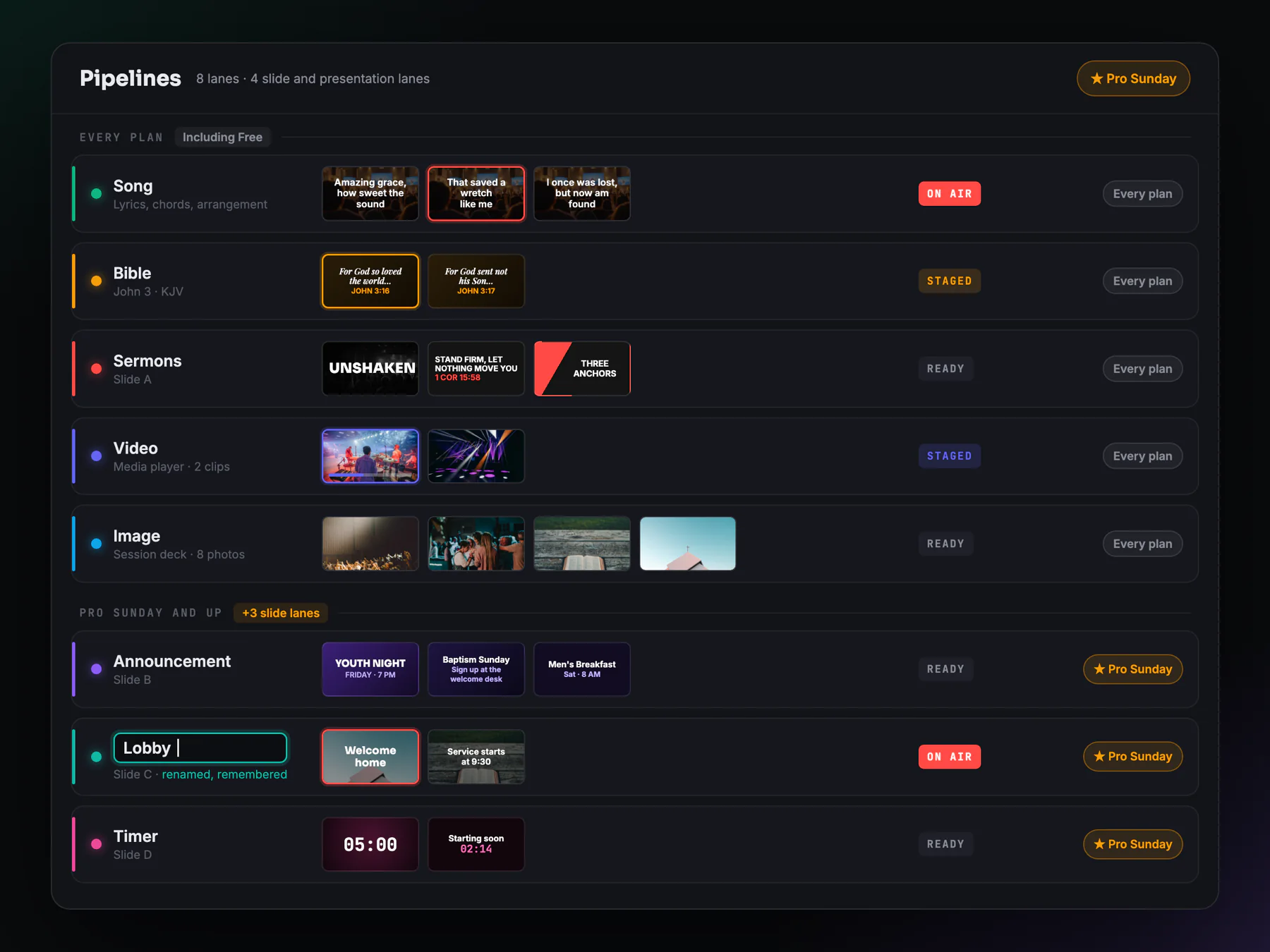
Five on every plan, three more for the rest
Song, Bible, Slide A, Video and Image are on every plan, including the free one. The extra slide lanes, B, C and D, arrive with Premium. They are identical in capability to Slide A and exist so the notices, the lobby loop and the countdown do not have to take turns in one deck. The defaults are only fallbacks; each lane can be renamed to whatever your team calls it.
- Five pipelines on every plan, Slide B, C and D from Premium up
- Four independent slide and presentation lanes in total
- Defaults for announcements, lobby and timers
- Renamed once, remembered afterwards
Song, Bible, Slide A, Video and Image are on every plan. Slide B, C and D need Premium.
About this feature
No. Exactly one pipeline is the master at any moment. That is deliberate: it means sending something live is always an explicit action, and there is never ambiguity about what the congregation is looking at.
Try it before next Sunday
Start Premium trial
Free for 30 days with every Premium feature: stage screen, extra outputs and broadcast. No card, and you keep the app on the Free plan afterwards.
Create account and start trialThree steps: create your account, start your 30-day Premium trial in one click, then download ChristChant and sign in. Every feature, no credit card.